
Contents
In today's quick-paced digital ecosystem, a Twitter name is not merely a tag, but a part of who you are. You will need to know how to change your Twitter name if you are trying to either build a personal brand or run a business account, or just update your profile. Luckily, altering your Twitter profile name or username is a breeze, and in no way does it endanger your followers or your tweets. So, a positive approach is what it takes to easily change your Twitter name and keep your web presence sturdy.
This guide is a detailed step process of how to change Twitter name, change Twitter username, and keeping your followers updated throughout the process.
Understanding the Difference: Username vs Display Name
Becoming familiar with the difference between a Twitter username and a display name is really helpful before you start. A Twitter username is the one that ends with the unique @ sign linked solely to your account, while your display name is the one that is highlighted in bold at the top of your profile.
Once you decide to edit Twitter name, you need to clarify which one you are going to change. However, you can adjust your Twitter profile name with more flexibility since it won’t be affected by mentions, while changing your Twitter username will change your @handle directly, and that’s what people use to tag you.
If your plan is to change Twitter name and change Twitter username as a duo, you will have to alter each one of them separately in your account's settings.
Reasons to Update Your Twitter Name in 2026
Maintaining a fresh online presence is crucial today. Whether you are rebranding, launching a project, or simply turning your style into a new one, spending time on updating Twitter name is a good way to maintain relevance. A handle or a profile name that was just perfect a couple of years ago may not truly describe who you are today.
Choosing to change Twitter name helps you stay aligned with your current goals and audience expectations. Plus, when you update your Twitter name across platforms, you create a consistent, recognisable brand identity. As Twitter automation and engagement evolve with AI, having an up-to-date and memorable handle is becoming even more important.
How to Change Twitter Username (Handle)
Switching your @handle, that is, your Twitter username, is an unobtrusive action that will also not affect your followers or posts. Here is the stuff on how to change your Twitter username on both desktop and mobile.
On Desktop:
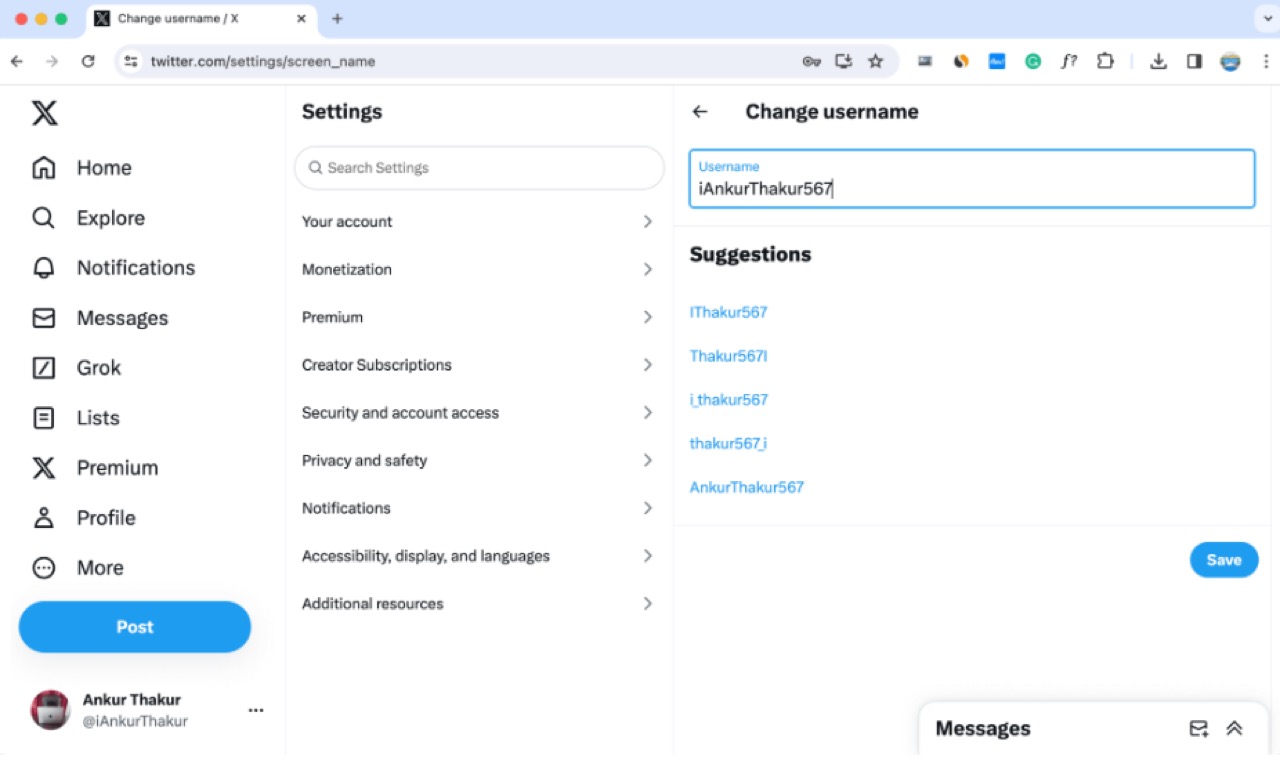
- Log into your Twitter account.
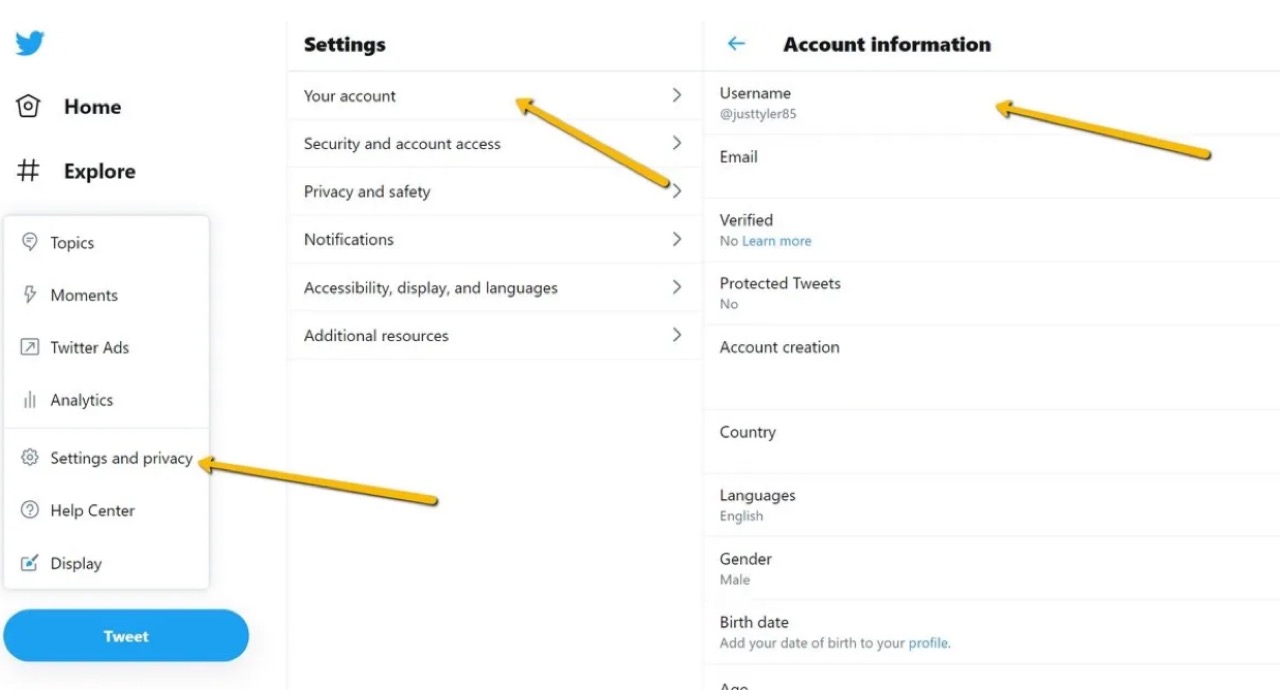
- Click More > Settings and Support > Settings and privacy.
- Select Your account > Account information.
- Enter your password if asked.
- Click Username and type in your new one.
- Save your changes.
On Mobile:
- Open the Twitter app andtap your profile picture.
- Navigate to Settings and Support > Settings and privacy.
- Tap Your account > Account information.
- Tap Username and enter your new handle.
When you change Twitter username, it is always a good idea to select an option that is brief, original, and relates to your product. And don’t forget to edit your Twitter name on your other profiles so everything stays consistent.
How to Edit Your Twitter Display Name
If changing the name listed on your profile is your only aim, then editing your display name is the easiest way. You can change your Twitter name as frequently as you want without any trouble like being unique or available.
On Desktop:
- Click Profile on the left-hand menu.
- Select Edit profile.
- Update the Name field.
- Save your changes.
On Mobile:
- Tap your profile picture and select Profile.
- Tap Edit profile.
- Update the Name field and save.
While you edit Twitter name, you are free to be imaginative, for example, you can include emojis, slogans, or styles in whichever way that pleases you. By doing so, you can use this platform to update your Twitter profile name and keep your audience fresh and interested.
What to Consider Before You Update Twitter Name
Altering your Twitter identity might be something that excites you, but you ought to think it through first. A new Twitter username might lead some to be briefly confused, and you may need to update your website links, email signature, and other social profiles.
Before you go on changing Twitter name or editing your Twitter name, if I may suggest, here are some points you really need to keep in mind:
- Availability: Double-check that your desired username is free.
- Consistency: Align your Twitter handle with your branding on Instagram, LinkedIn, and beyond.
- SEO and Discoverability: If your handle ranks in search engines, a sudden change might impact traffic temporarily.
- Communication: Make sure to let your followers know about the change so they aren’t left wondering where you disappeared to.
Careful planning before you edit Twitter name will make sure everything goes smoothly and your brand stays strong. If you run outreach on X, a consistent handle also helps leads you reach through profile scraping and DMs recognize you right away.
Will Changing Your Twitter Name Affect Your Account?
Here’s the good news: when you change Twitter name or change Twitter username, your tweets, followers, DMs, and media all stay put. Nothing else changes except the name people see and use to tag you.
One thing to watch out for, though — once you change Twitter username, your old handle becomes available for someone else to claim. If your previous username was important for branding, consider grabbing it with a backup account or redirecting traffic there.
Protecting your Twitter profile name helps you avoid confusion and ensures nobody else benefits from your old branding.
Actions to Take After You Edit Twitter Name
After you change your Twitter name, a few quick actions can keep everything running smoothly:
- Pin a Tweet: Announce your name change so followers aren’t confused.
- Update External Links: Refresh your bio links on your website, emails, and other social platforms.
- Monitor Mentions: Watch for users tagging your old username and reply to guide them.
- Secure the Old Handle: If it’s important, create a placeholder account to reserve it.
A little housekeeping after you edit your Twitter name can make a big difference in how easily people continue to find and recognise you.
Conclusion
Learning how to change Twitter name is imperative if you want to keep your digital presence fresh and alive in 2026. Be it rebranding, business expansion, or personal growth, one way or another, your Twitter profile name must be updated to give an image that is aligned with whom you are today.
Take the time to update Twitter name thoughtfully, communicate clearly with your followers, and stay consistent across platforms. Your Twitter handle is more than just a tag — it’s part of your story. Make sure it reflects exactly the right message.
FAQs
Is it possible to change Twitter username without losing my followers?
Yes, you can change your Twitter username without it affecting your followers. Your tweets, likes, and DMs will remain the same. But, to avoid any confusions, it’s better to your audience especially if the new handle is really different from the original one.
What’s the maximum frequency I can change Twitter name?
There is no limit to how many times you can change your Twitter name or display name. However, if you make frequent changes, it may confuse your followers and hurt your brand image. So, it’s better to change it only when it contributes to added value or clarity.
What’s the difference between display name and username?
Your display name appears in bold on your profile and can be anything. The username is your unique @handle. When you change Twitter name, you might edit both depending on whether you need a visual refresh or handle update.
How often can you change your Twitter username?
X does not cap how many times you can change your username or display name, so you can update either as often as you like. That said, frequent changes can confuse followers and weaken your brand, so only change when it adds clarity or value. If you ever get stuck signing back in after an update, our guide on Twitter login and troubleshooting walks through the fixes.
Does changing my Twitter username break my old links and mentions?
Your profile stays intact, but your old @handle becomes free for someone else to claim, and older mentions that used it will no longer point to you. Update your bio links and pin a post so people can find your new handle.





Your next customer is already on X.
Find the people talking about what you sell, message them on a safe schedule, and turn the replies into booked calls.
- Scrape leads from any tweet, keyword or X List
- Auto-DM new followers and people who engage
- Follow-ups that stop the moment someone replies
- Safe daily limits and warm-up, built in
- Every reply tracked through to a booked call
Free Test plan · no credit card.
Related posts


Ready to automate your Twitter DMs?
Start sending personalized DM campaigns to your target audience today. Get higher response rates and more leads than cold emails.