
Contents
In 2026, privacy on social media matters more than ever. Whether you're trying to avoid unwanted attention, filter out random followers, or just prefer to keep your content personal, knowing how to activate twitter private settings is one of the smartest digital decisions you can make. With X (formerly Twitter) now deeply integrated into real-time media, news, and public conversations, understanding how to set boundaries on your profile gives you full control over what you share and who sees it.
This guide walks you through the exact steps to turn on twitter private mode using X’s updated privacy controls and includes tips, visuals, and common questions answered at the end.
Why Would You Use Twitter Private Settings?
Social platforms thrive on visibility, but not every user wants to broadcast their thoughts to the world. If you’re using X to connect with friends, follow interests, or engage in community discussions, the Twitter private setting can make sense.
When you turn on twitter private, only your approved followers can see your tweets, replies, media, and likes. Your posts won’t show up in public search results, trending topics, or explore pages. That kind of control is powerful in today’s fast-moving, data-driven internet culture.
Best of all, activating twitter private mode doesn’t delete old content — it just shields it from the wider world.
What Happens After You Make Twitter Private?
The moment you switch to twitter private, several things happen:
- Your tweets become visible only to approved followers.
- New followers must request access.
- Your content won’t appear in Google or X search unless someone follows you.
- Retweets from your posts are disabled.
- Replies and mentions are hidden from non-followers.
These features make twitter private ideal for users who want to reduce unwanted attention without deleting their profiles entirely. It gives you more peace of mind without sacrificing engagement with people you trust.
How to Enable Twitter Private on Desktop
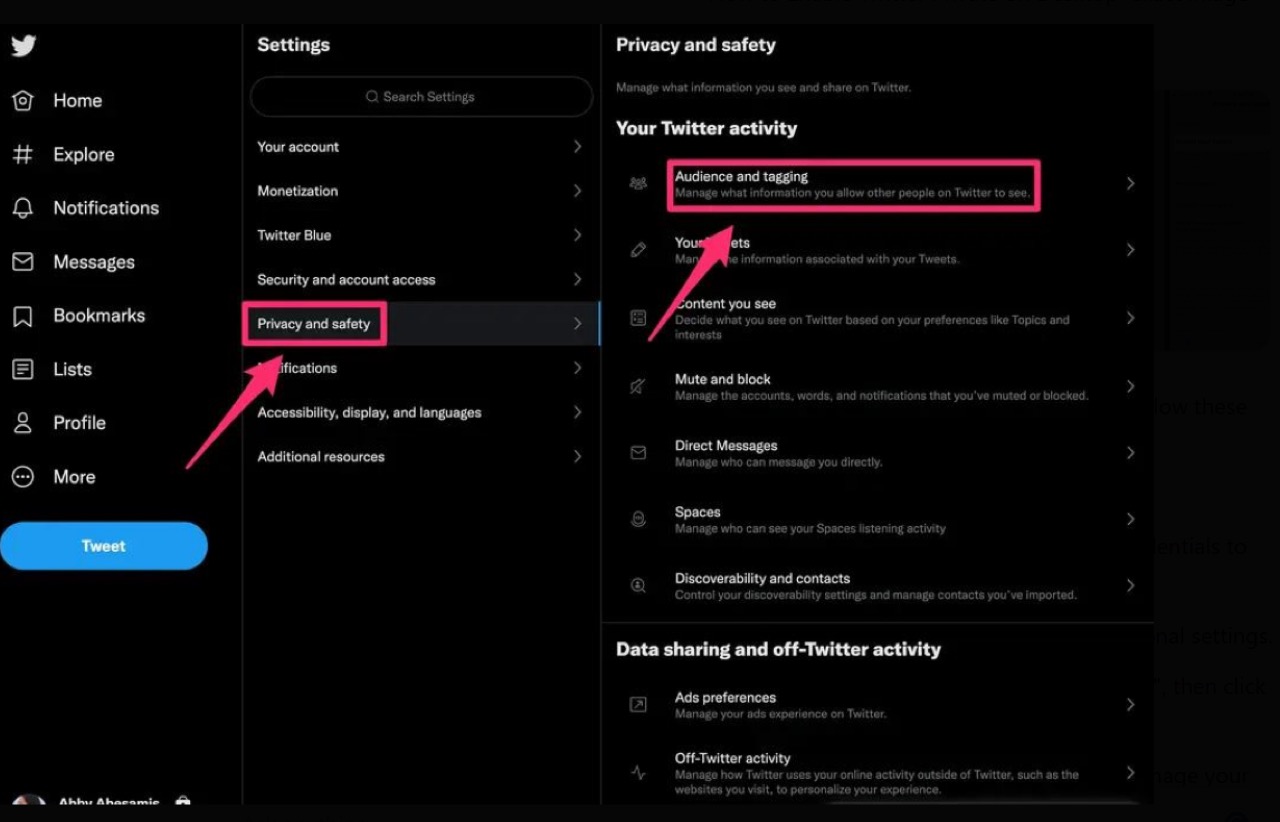
To activate twitter private mode on the desktop:
- Log into X from your browser.
- Click More on the left menu.
- Go to Settings and Support > Settings and privacy.
- Click Privacy and safety.
- Select Audience and tagging.
- Toggle Protect your posts.
With those steps, your account is now twitter private and protected from public visibility. It’s reversible, too, meaning you can go back to public mode whenever you like — a feature many users appreciate during job searches or sensitive conversations.
How to Turn on Twitter Private on Mobile
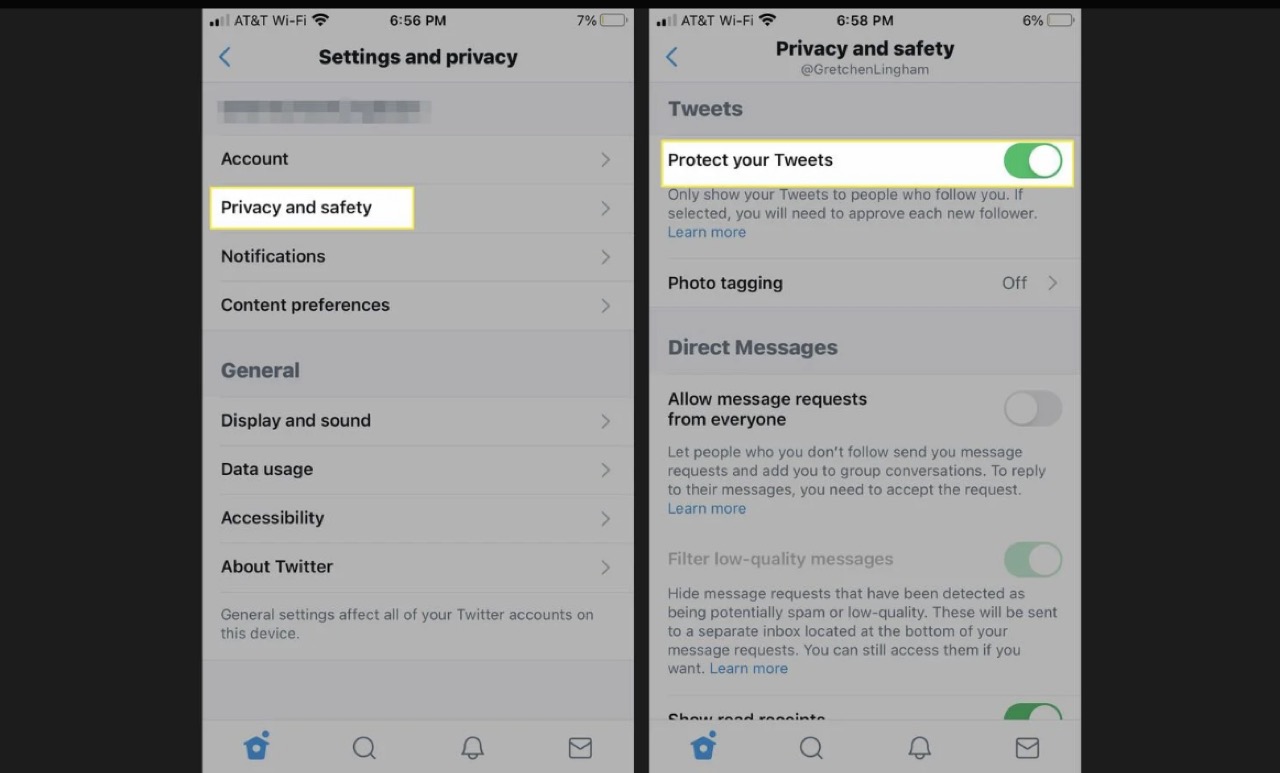
To make your twitter private settings work on mobile:
- Open the X app.
- Tap your profile picture.
- Go to Settings and Support > Settings and privacy.
- Tap Privacy and safety > Audience and tagging.
- Turn on Protect your posts.
Once activated, your account becomes twitter private instantly. People will need to request access to view your tweets or follow you. For frequent mobile users, this quick toggle provides strong protection and a break from public feed pressure.
What About Old Tweets and Existing Followers?
When you go twitter private, current followers still have access. But new people must request to follow you. If someone already took a screenshot or shared your tweet externally, those can't be removed — something to keep in mind.
To strengthen your privacy further, many users also review or remove old followers when switching to twitter private mode. It’s an easy way to reduce visibility to dormant or unknown accounts without losing meaningful connections.
Can You Switch Twitter Private On and Off?
Absolutely. The twitter private toggle can be flipped whenever needed. Many users go private temporarily — during political events, hiring seasons, or online drama — and then revert to public once things settle.
The flexibility of twitter private settings is part of its strength. You can adapt to situations without losing your content, followers, or reach.
Does Twitter Private Affect Engagement?
Yes — but it’s not necessarily a bad thing. When you go twitter private, your content won’t be featured in trending topics or search results, but your account becomes a safe, curated space.
It helps cut spam, limits bot replies, and gives more meaningful interaction. Users who switch to twitter private often report higher quality engagement and fewer distractions — which is perfect for personal use or smaller communities.
Final Thoughts
In a world where public visibility can sometimes backfire, knowing how to use twitter private settings gives you freedom. Whether you're managing your professional image, curating your follower base, or just taking a break from the noise, the option is there.
More than just a feature, twitter private mode is a mindset — choosing peace over performance, connection over clout. And in 2026, that’s a smart move.
If you’re already reviewing your privacy controls, it’s also worth checking what kind of content X shows you by default. Many users don’t realise they can customise this too. For example, how to turn off sensitive content on X walks you through adjusting visibility filters so your timeline isn’t unnecessarily restricted or blurred.
FAQs
1. Does switching to twitter private delete my old tweets?
No. It just hides them from non-followers. If someone already follows you, they can still view your timeline unless you manually remove them after turning on twitter private.
2. Can people still mention me if my account is twitter private?
Yes, but only your followers will see your replies or mentions in full context. This is one of the hidden benefits of enabling twitter private — it limits noise from strangers.
3. What happens if I go twitter private and then switch back?
All restrictions are lifted once you go public again. Anyone can follow you, view tweets, and see your activity. But while you're on twitter private, they must send a request first.
4. Is there a visual indicator that shows my account is twitter private?
Yes — once enabled, a small lock icon appears next to your profile name. It’s the official indicator that you’ve activated twitter private settings.





Your next customer is already on X.
Find the people talking about what you sell, message them on a safe schedule, and turn the replies into booked calls.
- Scrape leads from any tweet, keyword or X List
- Auto-DM new followers and people who engage
- Follow-ups that stop the moment someone replies
- Safe daily limits and warm-up, built in
- Every reply tracked through to a booked call
Free Test plan · no credit card.
Related posts


Ready to automate your Twitter DMs?
Start sending personalized DM campaigns to your target audience today. Get higher response rates and more leads than cold emails.