

Contents
Ever scroll through Twitter and find a video that makes you laugh so hard you cry? Or maybe one that teaches you something new? Naturally, you want to save it. But here’s the thing — Twitter doesn’t have a download button. Video content is everywhere on the platform, yet there’s no easy way to save it for later.
Good news: You can download Twitter videos straight to your device — no app is required. This guide shows you quick and safe ways to save Twitter videos in just a few clicks.
Why Download Twitter Videos?

There are plenty of good reasons to download Twitter videos, whether it's for personal use, education, or sharing.
1. Offline Viewing
Heading into a tunnel? On a flight? No internet? If you’ve already downloaded the video, no problem. Saved Twitter videos let you watch whenever, wherever — totally offline.
2. Archiving Important Content
Twitter moves fast. Tweets disappear, videos get deleted, and accounts go private. Downloading lets you preserve Twitter videos before they’re gone for good.
3. Sharing Beyond Twitter
Want to post that funny clip to your Instagram story? Or send it to your group chat? When you save Twitter videos, you can share them across platforms without sending a Twitter link.
4. Learning and Reference
From coding tips to historical documentaries, Twitter is packed with valuable lessons. Download these clips and rewatch them as often as you want. Perfect for students, teachers, and self-learners.
How to Download Twitter Videos Without Apps
You don’t need to install any apps to download videos from Twitter. Here are the best no-app-required methods:
1. Use an Online Twitter Video Downloader
Online tools let you download Twitter videos by simply pasting a link. They’re fast and work across devices.
Steps:
- Find a reliable Twitter video downloader (search “Download Twitter video online”).
- Copy the tweet link containing the video.
- Paste it into the downloader.
- Choose your preferred video quality.
- Hit download.
Pro Tip: Avoid sites with excessive pop-ups or shady redirects. Stick to trusted platforms.
2. Add a Browser Extension
Browser extensions work great if you download Twitter videos often. They add a download button right in your browser.
Steps:
- Install a Twitter video downloader extension from your browser’s store.
- Go to a tweet with a video.
- Click the extension icon.
- Select the video quality and click download.
Note: Extensions are ideal for desktop use and may not work well on mobile browsers.
3. Use the Inspect Element Method (Advanced Users)

This one’s for power users. It doesn’t require extra tools, but you’ll need to poke around in the page code.
Steps:
- Open the tweet with the video.
- Right-click the video and select “Inspect” or “Inspect Element.”
- Look for the video URL in the <video> tag or network requests.
- Copy the URL and open it in a new tab.
- Right-click the video and choose “Save video as…”
Which Twitter Video Download Method Should You Use?
Each method has its strengths. Here’s how to pick:
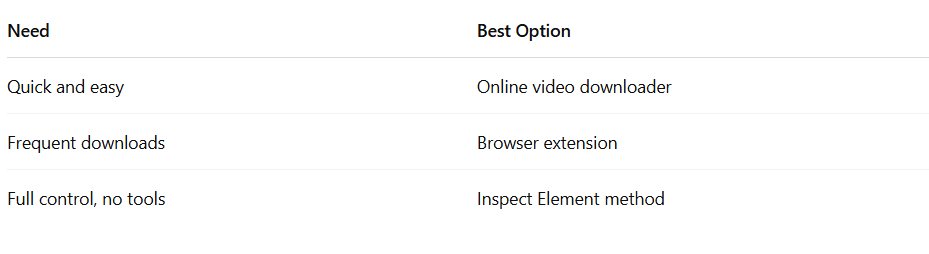
Is It Safe to Download Twitter Videos?
Yes, but be smart. Some downloaders may show sketchy ads or try to trick you into downloading extra software. Stick to these safety rules:
- Use well-reviewed download sites or extensions.
- Avoid clicking pop-ups or unrelated download buttons.
- Don’t enter any personal info.
- If your browser warns you, listen.
Troubleshooting Common Issues
Download Not Working
This can happen if:
- The video is from a private account.
- The tweet was deleted.
- The downloader is down. Try another method.
Low Video Quality
Sometimes when you download Twitter videos, the result isn’t as crisp as you expected. This can happen for a couple of reasons. First, the original upload may have been low quality—Twitter compresses videos heavily, and if the user posted a blurry or pixelated clip, that’s exactly what you’ll get when you download it. Second, many Twitter video downloader tools let you choose from different resolution options like 360p, 720p, or 1080p. If you don’t select the highest available quality, the downloaded video might look worse than it should. To get the clearest version possible, always go for the top resolution offered by the downloader.
Security Warnings
Not all Twitter video downloader websites or extensions are safe to use. Some may trigger browser security alerts for a reason — they might serve intrusive ads, try to install unwanted software, or even contain malware. If your browser warns you about a website being unsafe, take it seriously and don’t proceed. Stick to well-reviewed tools that don’t ask for personal information, login details, or unnecessary permissions. A good rule of thumb: if something feels off, it probably is. Always prioritize your device’s security over convenience when trying to save Twitter videos.
Final Thoughts
So, next time you come across a viral video, insightful clip, or must-share moment, you know what to do. Download Twitter videos using any of the methods above — quickly, safely, and without any extra apps.
Just remember: respect the original content creators. If you’re going to re-share or reuse videos, credit the source and follow copyright rules.
FAQs
Can I download Twitter videos on mobile?
Yes, you can download Twitter videos on mobile using online downloader websites. Just copy the tweet link, paste it into the site, choose video quality, and hit download. No app needed—just a browser.
Are Twitter video downloader sites safe to use?
Most are safe, but always be cautious. Use well-reviewed sites and avoid those with pop-ups or fake buttons. Never enter personal information. Stick to trusted Twitter video downloader tools to protect your device from malware or scams.
Why can’t I download some Twitter videos?
You might not be able to download private or deleted videos. If the tweet comes from a locked account or the video is removed, Twitter video downloader tools won’t work. Try another method or double-check the link.
Will the downloaded Twitter videos stay forever?
Yes, once you save Twitter videos to your device, they stay unless you delete them. Even if the tweet is removed later, your copy remains. That’s why downloading is great for preserving content you don’t want to lose.





Your next customer is already on X.
Find the people talking about what you sell, message them on a safe schedule, and turn the replies into booked calls.
- Scrape leads from any tweet, keyword or X List
- Auto-DM new followers and people who engage
- Follow-ups that stop the moment someone replies
- Safe daily limits and warm-up, built in
- Every reply tracked through to a booked call
Free Test plan · no credit card.
Related posts



Ready to automate your Twitter DMs?
Start sending personalized DM campaigns to your target audience today. Get higher response rates and more leads than cold emails.