

Contents
Tired of wasting hours on repetitive work? Task automation helps you reclaim your time by letting technology handle the boring stuff—like data entry, scheduling, and reporting—so you can focus on what truly matters.
In this guide, you’ll learn how to identify tasks ripe for automation, explore the best tools for your needs, and get step-by-step advice to launch your first automated workflow—no tech degree required. Let’s simplify your workday, one smart task at a time.
Why Automate? Unveiling the Power of Efficiency
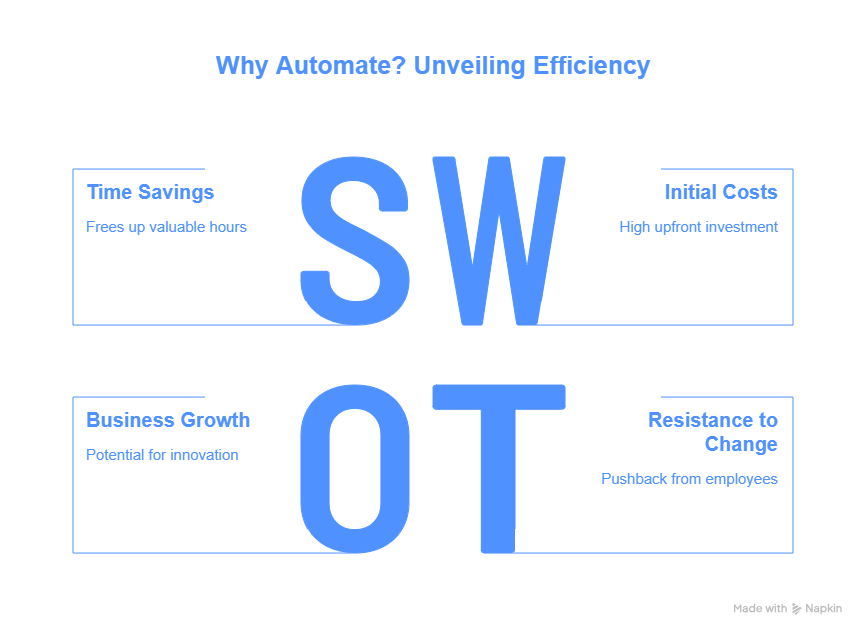
Automation can transform your work life. It makes things easier and quicker. Let's explore the great things automation can do for you.
Time Savings and Increased Productivity
Repetitive tasks eat up a huge amount of your time. Studies show that workers waste hours each week on boring tasks. Imagine getting those hours back!
Automation frees you to focus on bigger things. You can think strategically, solve tough problems, and be creative. This leads to innovation and growth. A study found that automation could save businesses up to 30% of their time. That's a lot of extra time for important work!
Reduced Errors and Improved Accuracy
Humans make mistakes. It's part of being human. But mistakes cost you time and money. Automation reduces these errors a lot.
Automated systems do things exactly the same way every time. Data entry, calculations, and reports become super accurate. This is vital in fields like finance and healthcare. When accuracy is important, automation is your friend.
Cost Savings and Increased Profitability
Think about the costs of manual labour. Salaries, benefits, and training add up. Automation cuts these costs by handling tasks faster.
Also, automation means fewer errors. This saves money by avoiding rework. Employees can focus on higher-value work. This makes the business more profitable overall. Companies see a return on their investment in automation, often within a year.
Identifying Prime Candidates for Automation
Not every task should be automated. Some tasks need a human touch. Here's how to spot the best candidates for automation.
The Repetitive Task Test
Does a task feel like you're doing the same thing over and over? Is it something you do often? If so, it's likely a good fit for automation.
Examples include:
- Marketing: Sending the same welcome email to every new subscriber.
- Sales: Entering customer data from forms into your CRM.
- Customer Support: Answering common questions about shipping.
These repetitive tasks eat time. Automating them can free up hours each week.
The Rule-Based Task Assessment
Rule-based tasks follow a clear set of instructions. If "this" happens, do "that". Computers excel at these types of tasks.
Examples include:
- Invoice Processing: If an invoice is over a certain amount, send it for approval.
- Lead Qualification: If a lead fills out a form with specific info, mark them as "qualified."
If you can write down the rules of a task, you can probably automate it.
The High-Volume Task Analysis
Think about tasks you do a lot. Even if each task is small, they add up over time. Automating these high-volume tasks can have a big impact.
Imagine processing hundreds of orders a day. Automating parts of this process can save your team huge time. Automating high-volume tasks gives you the best return on investment.
Choosing the Right Automation Tools
So many automation tools exist. Picking the right one can feel overwhelming. Here's a simple guide to choosing the right tool.
Understanding Different Types of Automation Tools
Different tools do different things. Here's a quick overview:
- Robotic Process Automation (RPA): RPA tools automate tasks that humans normally do. They work with existing systems. Good for data entry and moving information.
- Workflow Automation Platforms: These tools automate entire processes, from start to finish. They connect different apps and services. Great for automating approval processes.
- Integration Platforms: These platforms connect different apps so they can share data. Useful for syncing data between sales, marketing, and support tools.
Each type of tool has its strengths. The best choice depends on the tasks you want to automate.
Evaluating Your Specific Needs
Before you pick a tool, think about what you need.
- What are your key business processes?
- What technical skills do you and your team have?
- What is your budget for automation?
Pick tools that fit your needs and align with long-term goals. Don't pick a tool just because it's popular.
Popular Automation Tool Options
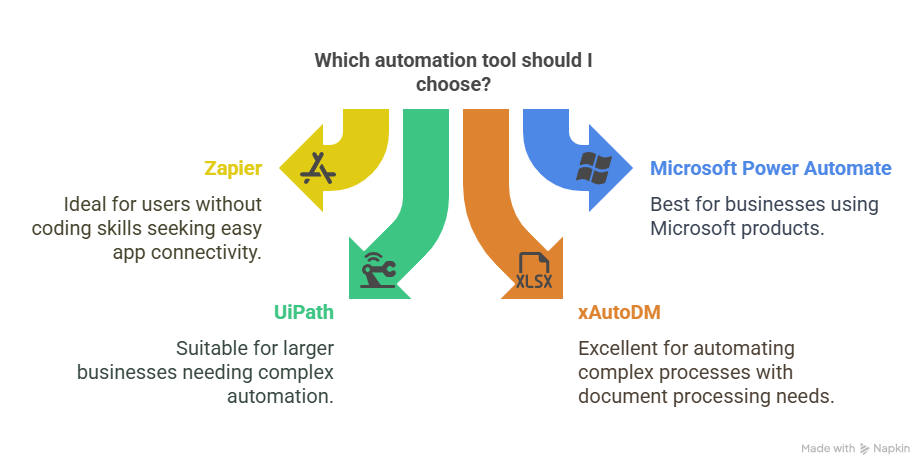
Here are a few popular choices to explore:
- Zapier: Connects apps and automates workflows. Easy to use, even without coding skills. Pricing starts free and scales up as you use it more.
- Microsoft Power Automate: Part of the Microsoft ecosystem. Good for businesses that use Microsoft products. Plans start at around £15 per user per month.
- UiPath: A powerful RPA tool for complex automation. Needs technical skills. Good for bigger businesses. Pricing is custom, depending on your needs.
- xAutoDM combines intuitive workflow design with powerful integration capabilities, making it exceptional for automating complex, multi-step processes without extensive technical expertise. xAutoDM intelligent document- processing feature extracts information from various file formats with remarkable accuracy.
Read reviews and try free trials. Find the tool that is right for you.
Implementing Your First Automation: A Step-by-Step Guide
Ready to dive in? Here's how to set up your first automation.
Start Small and Define Clear Goals
Don't try to automate everything at once. Start with a small, simple project.
For example, automate a welcome email for new newsletter subscribers. Set clear goals. How much time do you want to save? How many errors do you want to reduce? Track these metrics to see if your automation works.
Map Out the Workflow
Document the steps involved in your task. Use a flowchart or diagram. This makes it easier to understand and automate.
For the welcome email example, the steps might be:
- A User subscribes to the newsletter.
- The System adds users to the email list.
- The Automated tool sends welcome emails.
Mapping the workflow makes the automation process clear.
Test and Iterate
Test your automation thoroughly. Look for errors. Does it work as expected?
If you find problems, fix them. Get feedback from users. Adjust the automation based on the feedback. Keep making small changes over time.
Overcoming Common Automation Challenges
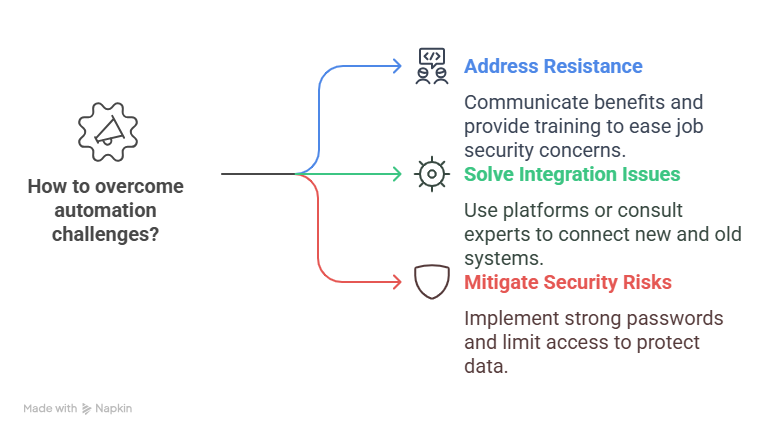
Automation is not always easy. Here are some challenges and how to overcome them.
Resistance to Change
Some people might worry about losing their jobs. Explain that automation frees them up for more important work. Train people to use the new tools. Show them how automation makes their jobs easier.
Integration Issues
Connecting new tools with old systems can be hard. Use integration platforms to connect systems. If you have problems, ask an expert for help.
Security Risks
Protect sensitive data when automating. Use strong passwords. Limit access to automation tools. Regularly review security settings.
Conclusion
Task automation is a potent tool. It transforms how you work. Automate repetitive tasks to save time. Reduce errors. Boost productivity.
Start small. Pick the right tools. Overcome challenges. You can reclaim your time and focus on what truly matters. Don't wait. Begin your automation journey today.
FAQs
What is the meaning of task automation?
Task automation involves employing technology to carry out repetitive or routine tasks with little human involvement. It entails setting up systems or software to perform specific tasks automatically, which conserves time and minimizes human mistakes.
What are the key benefits of implementing task automation?
Automating tasks minimizes human mistakes, boosts efficiency, and decreases operational expenses. It liberates employees from monotonous tasks, enabling them to concentrate on strategic activities. Automation guarantees consistency and can function non-stop without interruptions.
What common business processes are suitable for automation?
Automation is well-suited for tasks such as data entry and processing, handling customer service inquiries, processing invoices, and generating reports. With the appropriate tools, automating email replies, scheduling appointments, managing inventory, and posting on social media can also be done efficiently.





Your next customer is already on X.
Find the people talking about what you sell, message them on a safe schedule, and turn the replies into booked calls.
- Scrape leads from any tweet, keyword or X List
- Auto-DM new followers and people who engage
- Follow-ups that stop the moment someone replies
- Safe daily limits and warm-up, built in
- Every reply tracked through to a booked call
Free Test plan · no credit card.
Related posts



Ready to automate your Twitter DMs?
Start sending personalized DM campaigns to your target audience today. Get higher response rates and more leads than cold emails.