

Contents
Picture having a digital helper operating for you around the clock on Twitter—even while you’re resting. A Twitter bot can handle your interactions, share updates, and connect with followers without you having to do anything. These bots serve as effective instruments for establishing a stable and engaged presence on the internet.
This piece will walk you through the process of building your customized Twitter bot, step by step. You will discover how to enhance engagement, save time, and effortlessly uphold a robust online presence.
Why Build a Twitter Bot in 2025?
In 2025, Twitter bots have evolved beyond mere tech novelties—they are intelligent resources that assist you in saving time, maintaining engagement, and expanding your digital footprint. Whether you’re a business owner, content producer, or a small enterprise, bots can manage repetitive activities while keeping your audience engaged around the clock.
- Enhance efficiency by automating tweets, responses, and follows.
- Enhance your intelligence with instant data and customized interaction.
Understanding Twitter Bot Ethics and Policies
Building a Twitter bot isn’t just about automation—it’s about doing it right. In 2025, Twitter’s updated API policies demand more responsibility from developers. The difference between a helpful assistant and a spammy nuisance lies in how your bot behaves. Be transparent—make it clear your bot is automated, and always respect rate limits. Responsible automation ensures your bot adds value, not noise. Break the rules, and you risk suspension or losing API access altogether. Playing smart with ethics and policy is what separates clever creators from careless spammers.
Planning Your Bot: Define Your Purpose
Every great Twitter bot starts with a clear purpose. Whether it's curating content, answering customer questions, engaging with your community, gathering data, or just entertaining—your bot should have a defined role. Use a worksheet to outline its goals and functions to keep your automation focused and effective.
Tools and Technologies You'll Need
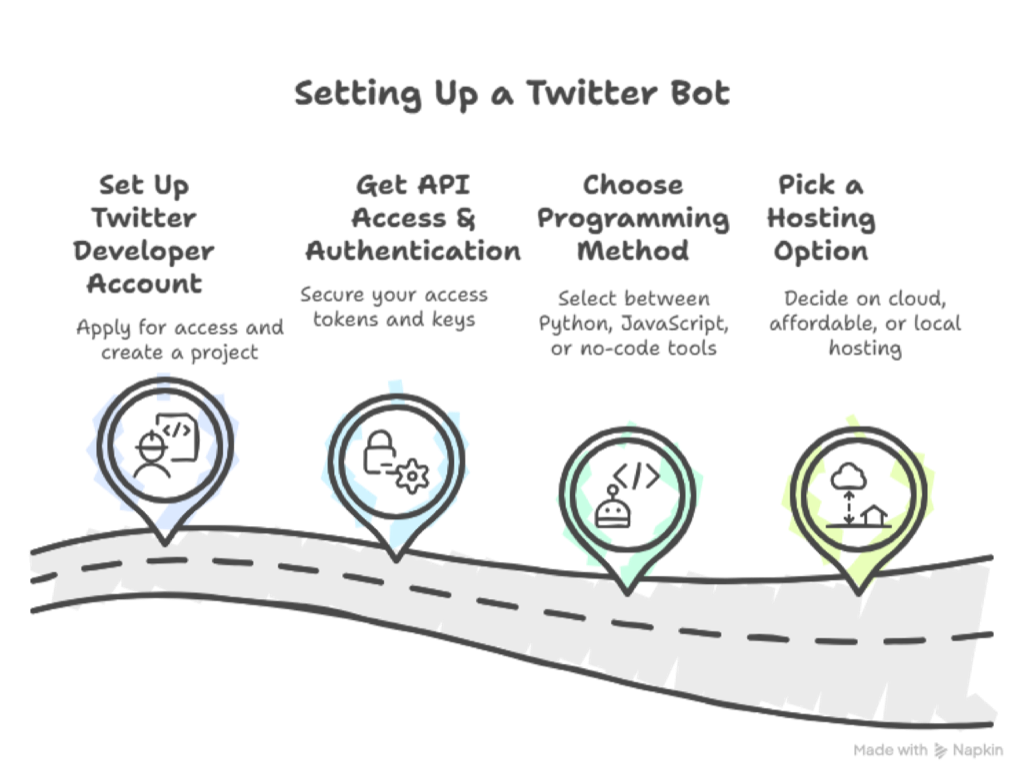
Tools and Technologies You'll Need – Step by Step
-
Set Up a Twitter Developer Account: Apply for access and create a project to get your API keys.
-
Get API Access & Authentication: Secure your access tokens and keys to connect your bot to Twitter safely.
-
Choose a Programming Method:
-
- Python: Use the Tweepy library.
- JavaScript: Use twitter-api-v2.
- No-Code: Tools like Zapier or Pipedream are great for beginners.
-
Pick a Hosting Option:
-
- Cloud: AWS, Google Cloud, or Azure for scalability.
- Affordable: Heroku or PythonAnywhere for quick and easy deployment.
- Local: Good for testing but not ideal for 24/7 bots.
Step-by-Step Bot Building Tutorial
Step-by-Step Bot Building Tutorial
-
Set Up Your Development Environment: Install your chosen programming language (like Python) and necessary libraries (e.g., Tweepy).
-
Obtain API Credentials: Use your Twitter Developer Account to generate API keys and access tokens.
-
Build Basic Bot Functions:
-
Automate tweets and retweets on a schedule.
- Respond to mentions with preset or dynamic replies.
- Follow and engage with users based on hashtags or keywords.
- Curate and share relevant content automatically.
-
Use Sample Code Templates: Start with simple, well-documented scripts to understand each function.
-
Test in a Sandbox Environment: Run your bot in a controlled setting to debug, refine responses, and ensure it behaves as intended.
Advanced Features to Consider
Take your Twitter bot to the next level with advanced features. Use natural language processing for intelligent replies and sentiment analysis to understand your audience. Add media support for richer posts, schedule content in advance, and integrate with other platforms. Track performance through analytics to continuously improve your bot’s impact.
Deploying and Monitoring Your Bot
Once your bot is ready, deploy it from your local setup to a live server for continuous operation. Use error handling and alerts to catch issues early, and monitor performance with tracking tools. Regularly update your code, review logs, and schedule maintenance to keep things smooth. Be ready to troubleshoot common hiccups like rate limits or API changes.
Conclusion
Did I start this bot journey sceptical, but now? Total game-changer for my online presence in 2025. The hours I've reclaimed from not manually scheduling posts at ridiculous times have been worth every minute spent coding. Sure, I've had some hiccups—like when my bot accidentally retweeted a competitor's sale (awkward!)—but that's part of the learning curve.
Whether you're pushing your personal brand, managing a small business account, or just tired of being glued to Twitter all day, building your own digital assistant makes actual sense now. The tech's accessible, the impact is immediate, and honestly, it's kinda fun once you get the hang of it.





Your next customer is already on X.
Find the people talking about what you sell, message them on a safe schedule, and turn the replies into booked calls.
- Scrape leads from any tweet, keyword or X List
- Auto-DM new followers and people who engage
- Follow-ups that stop the moment someone replies
- Safe daily limits and warm-up, built in
- Every reply tracked through to a booked call
Free Test plan · no credit card.
Related posts

Ready to automate your Twitter DMs?
Start sending personalized DM campaigns to your target audience today. Get higher response rates and more leads than cold emails.